 HOOD WARFARE
Hood Warfare.
Take the block.
A street corner. Two crews. One point to own.
Drop into a free browser FPS with brick-built characters, fast firefights, and your friends.
No download. No account. Keyboard & mouse.
Your crew.
Your way to play.
One map, three weapons, and a fight worth coming back for.
Solo vs. bots
Get straight into the action with two bot teammates. Warm up, find your route, and take point A.
Find a match
Meet other players in a five-second queue. If the lobby needs more players, bots fill the open spots.
Bring your friends
Share a room link. Play on one team or split into rivals. Odd numbers welcome, with optional bots.
Hood Warfare: control the street, together.
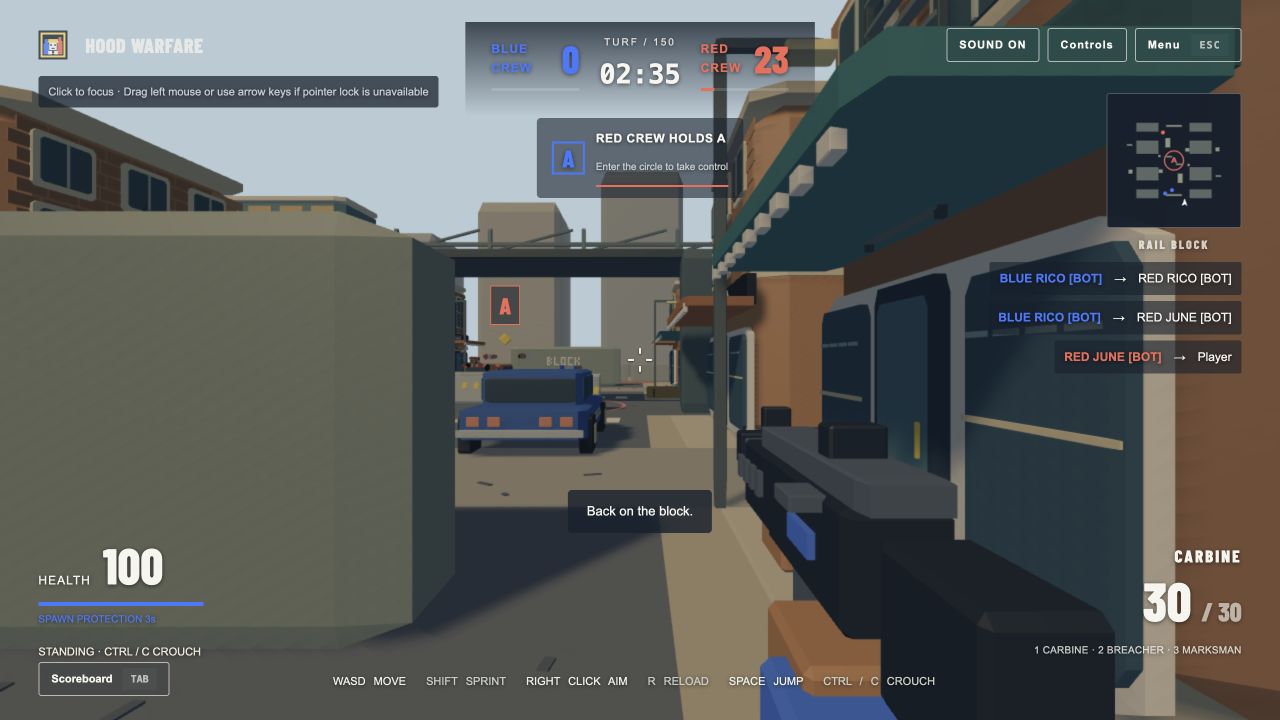
Hood Warfare is a free, independent browser shooter built around one objective: capture the glowing circle at the center of Rail Block. Hold it to earn team points. When both teams enter, scoring pauses until one crew clears the point. The first team to 150 wins; after three minutes, the higher score takes the block.
Take the main street for a direct fight, slip into the back alleys for a flank, or work around the storefronts and vehicle cover. Crouch behind low walls, jump onto crates, and reload before the next push. Every player gets the Carbine, Breacher shotgun, and Marksman rifle for free.
Play a solo bot game, queue with other players, or invite friends into a custom room. The live scoreboard tracks kills, deaths, captures, objective time, and score. Completed public and solo games appear on separate leaderboards. Custom matches keep their own results.
This is an original browser project with stylized brick characters and its own map and assets. It is not an official web port of the Steam game with the same name. Learn more about the project or read the complete Hood Warfare controls and rules.
Hood Warfare questions, answered.
Everything you need before your first match.
What is Hood Warfare in the browser?
This is an independent, original street-block FPS you can play on a website. You choose a brick-built character and join the Blue or Red crew on Rail Block. Both sides fight for point A, a capture zone in the center of the map. The browser release has its own map, models, interface, and rules. It is separate from the game sold on Steam under the same name and is not an official web port. The focus here is getting into a short, readable match with bots or friends.
Is the game free, and do I need an account?
All three launch weapons and all four character appearances are available for free. There is no download, paid weapon shop, subscription, or account registration. Enter a display name in the lobby and choose your character. Your browser keeps an anonymous session for online rooms and completed scores. Use an alias instead of your real name. If you clear browser storage or change browsers, the game may treat you as a new player; your earlier leaderboard identity does not automatically move to the new browser.
How does the five-second queue work?
Find a match opens a public room for up to five seconds. Players who queue while that room has space can join the same match. When the timer expires, the game starts with the people already present and fills the remaining spaces with labeled bots. You do not have to keep waiting for a full human lobby. A friend-room host can also queue an assembled party together. This is a quick-play queue, without skill ratings or a separate ranked ladder. Connection quality still depends on your device and network.
Can three, five, or seven friends play together?
Yes. A friend room supports up to eight human players and does not require an even number. The host can put everyone on the same side against bots, choose split teams, or move individual players to either crew. A three-person group can play together against the AI or make a two-versus-one match. Turn bot fill off for a pure friend-versus-friend game when both teams have at least one player. Invite your crew before pressing Start, because new participants cannot enter a match after it has begun.
How do I win a capture-point match?
Move into the glowing circle at point A and keep the enemy crew out. A clean capture takes four seconds. Once your team owns the point, it earns 1.5 team points per second. If players from both sides are inside, the point is contested and stops scoring. Kills do not directly add to the team win target; they create a chance to capture or defend. Your team wins by reaching 150 points, or by having the higher total when the three-minute clock ends. A tied final total is a draw.
What makes the three weapons different?
The Carbine is the steady all-round choice: a 30-round magazine, frequent shots, and reliable mid-range pressure. The Breacher fires eight shotgun pellets and works best around corners, storefronts, and close cover; it carries six shells. The Marksman has a 12-round magazine and stronger individual hits, but rewards careful aim. All weapons have distance falloff, reload times, and headshot multipliers. Switch with 1, 2, or 3 whenever your character is alive. Switching during a reload cancels it, so a half-finished reload will not magically refill the magazine.
Which browser and controls should I use?
Use a current desktop browser with WebGL 2 and hardware acceleration, with a keyboard and mouse. WASD moves, the mouse aims, left click fires, and right click holds aim. Shift sprints, Space jumps, Ctrl or C crouches, and R reloads. Click the canvas so it receives your keys. If the browser cannot lock the pointer, drag with the left mouse button or use the arrow keys to turn. The site works on smaller screens for reading, but touch combat controls are not included in the first release.
What happens when I get defeated or disconnect?
A defeated character breaks into bricks and returns after four seconds with full health and ammunition. Brief spawn protection gives you a chance to move; it ends when you shoot or leave the spawn area. An online match continues while you open the menu or switch away from the tab. During a short network interruption, the client attempts to reconnect to your existing character and stops sending movement until the connection returns. If you deliberately leave the match, you end your participation. Local practice can be paused and does not require a server connection.
How are leaderboard points calculated?
Your personal match score is separate from the team score that decides the winner. Each kill adds 100 personal points, each capture adds 250, and every full second spent in the objective adds 5. The board also shows deaths, captures, objective seconds, wins, and completed matches. Finished public games and Solo vs. bots games accumulate on separate global boards. Private custom rooms and local practice are excluded. Online results are calculated by the server, so typing a larger score into a browser request does not create a leaderboard result.
What should I try in my first few matches?
Start with Solo vs. bots to learn the map and recoil without a waiting lobby. Follow the main street toward the capture circle, then try one of the outer alleys to see where flanks enter. Use a car or low wall to break line of sight when you need to reload. Crouch to lower your head behind cover and jump onto a small crate to find another firing angle. Keep an eye on the capture status, because a good fight away from the point can still leave your team losing on turf.
Need the full key list? Read how to play Hood Warfare. For bugs, visit game support.